

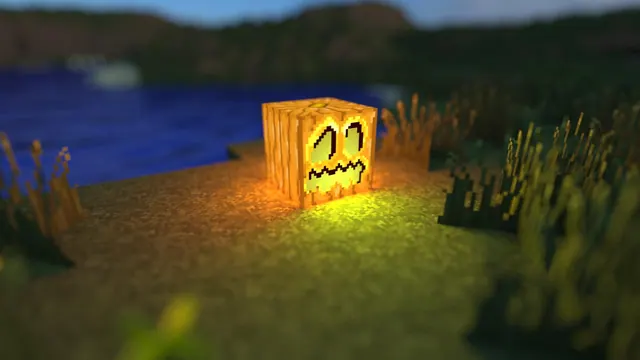
A glowing Minecraft Jack o'Lantern sits on a grassy riverbank at twilight with warm light and soft depth of field.
This scene is an external Chunky render of a vanilla Java Edition river biome at twilight. Rather than relying on complex builds, the composition focuses on a single Jack o'Lantern resting on a grassy riverbank. The block's internal torch light casts a warm, localised glow across the grass, while a shallow depth of field blurs the dark water and distant terrain into a soft background. It is a quiet, seasonal nod to Halloween that avoids heavy visual clutter.
The source image is a native 1920x1080 resolution, meaning it is built for standard 16:9 full HD desktop monitors and laptops. Because the largest size is below 4K, it will need to upscale on 1440p or 2160p displays,though the soft depth of field hides pixelation better than sharp in-game screenshots. Smaller landscape versions are available at 1280x720 and 854x480 for older screens, alongside a vertical 480x854 crop suited to basic mobile setups.
Because the calmest area sits along the bottom, this wallpaper works well if you keep your desktop icons aligned to the lower edge or rely on a busy dock. On a dark-mode operating system, the deep pine (#18211c) and slate (#2b2f30) shadows prevent eye strain during night use. You can pull your system accent colour directly from the pumpkin's warm illumination by setting your taskbar and window borders to a muted ochre (#605724) or olive (#454025).
To recreate this shot yourself, craft a Jack o'Lantern using a carved pumpkin and a torch, then place it beside any standard river biome as the sun sets. Since this specific look relies on path-tracing, you would need to export your world chunk into Chunky to achieve the exact camera blur and light falloff, though a similar mood is possible in-game using a shader pack with configurable depth-of-field.
Best used as: Download the 1920x1080 version for a standard 16:9 desktop monitor and arrange your application shortcuts along the calm bottom edge.
Wallpapers that share the most with this one




More block & item wallpapers


More river wallpapers

Wallpapers in the same colour family


More desktop wallpapers










