

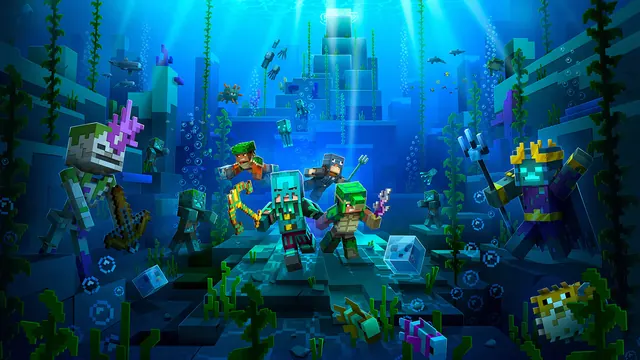
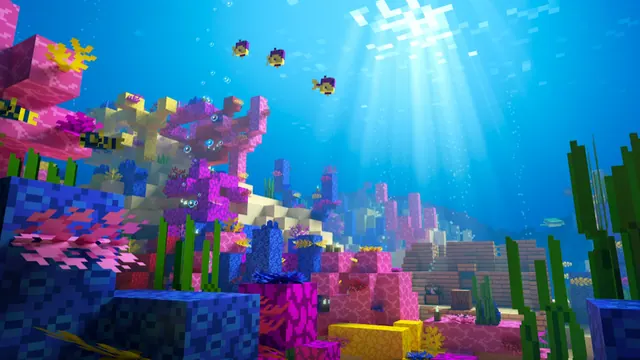
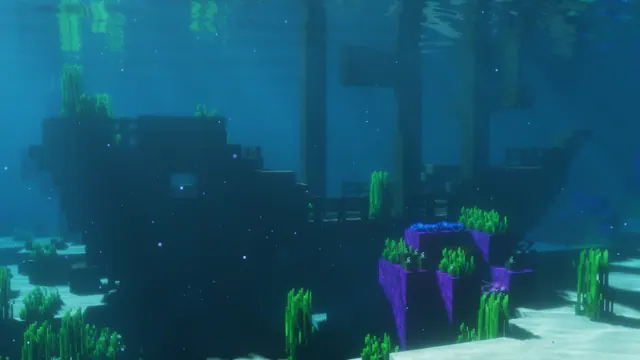
Rays of sunlight pierce the ocean surface, illuminating vibrant coral blocks and a lurking drowned.
This underwater scene captures the warm ocean biome introduced in the 1.13 Update Aquatic. Rather than relying on a player-built structure, it highlights pure vanilla terrain generation enhanced by a shader pack. Heavy volumetric light rays pierce the water's surface, illuminating clusters of coral blocks and a lurking Drowned in the mid-ground. To recreate a shot like this in your own world, locate a warm ocean biome, install a shader that supports underwater god rays, and wait for midday when the sun angles directly down through the water column.
The source image is 1920 x 1080 pixels, meaning it caps out below 4K and will look somewhat soft if stretched across a 1440p or 2160p monitor. It suits a standard 1080p desktop monitor best, with smaller 16:9 landscape cuts available at 1280x720 and 854x480 for older laptops. There is also a 480x854 vertical crop for smaller mobile displays. Because the coral textures and light shafts fill the entire frame, there are no calm areas where icons or text sit well, making this a poor choice if you keep dozens of shortcuts on your desktop.
Despite the hostile mob, the overall mood is vibrant and dominated by rich aquatic blues. The palette moves from deep marine shadows (#014571) and muted indigo (#383f6a) up into brighter cyan tones (#10779c) where the sunlight hits. To make your setup match, set your system accent colour to a bright cyan like #279cc5 alongside a dark operating system theme. This keeps your taskbar and window borders aligned with the darkest parts of the ocean floor while echoing the sunlit water above.
Best used as: Download the native 1920x1080 file for a standard Full HD desktop monitor, and hide your desktop icons so they do not clash with the busy coral textures.
Wallpapers that share the most with this one




More mob wallpapers


More underwater wallpapers
Wallpapers in the same colour family


More desktop wallpapers











