

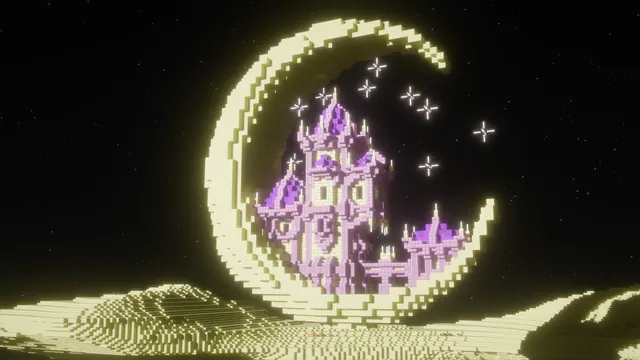
A dark fantasy castle with oxidized copper roofs and a glowing beacon stands beneath a tilted blocky moon and starry sky.
This dark fantasy fortress comes directly from Java Edition during the 1.17–1.18 Caves & Cliffs era, evident from the weathered, oxidized copper roofs crowning the towers. Despite using default vanilla textures, a custom shader tilts the blocky moon and casts realistic shadow gradients across the stonework, while a single beacon pierces the starry sky. To recreate a shot like this in-game, build a high-contrast silhouette using deepslate or blackstone walls paired with fully aged copper stairs, place a beacon at the central spire, and configure your shader pack to enable custom sky rotation at midnight.
The original capture measures 1920 x 1200 pixels, which is a native 16:10 aspect ratio suited to older productivity monitors and modern WUXGA laptop displays. There is no 4K version available; the file tops out just above standard 1080p, so it will look soft if stretched across a 27-inch 1440p or 4K panel. For standard widescreen monitors, grab the cropped 1920x1080 download, or step down to 1280x720 and 854x480 for smaller secondary windows. A vertical 480x854 cut also exists, though it is quite low-resolution for modern smartphones.
Because the castle sits anchored toward the centre, you get uncluttered margins along the left, right, top, and bottom edges. This central framing means desktop folder columns on either side of the screen will not cover the build, and a top-mounted status bar or phone lock-screen clock remains completely legible against the dark sky. The palette is heavily dominated by pitch black (#000000) and deep charcoal tones (#111214, #09090b), warmed slightly by a muted earthy brown (#41372a) around the lit stonework. Set your operating system to dark mode and pick a warm amber or oxidized teal accent colour to echo the copper roofs and beacon beam without breaking the low-light mood.
Best used as: Use the native 1920x1200 source file for 16:10 laptops, or pick the 1920x1080 crop for a standard 16:9 desktop monitor where icons sit along the left and right edges.
Wallpapers that share the most with this one




More build / architecture wallpapers






More fantasy wallpapers




Wallpapers in the same colour family




More desktop wallpapers





