

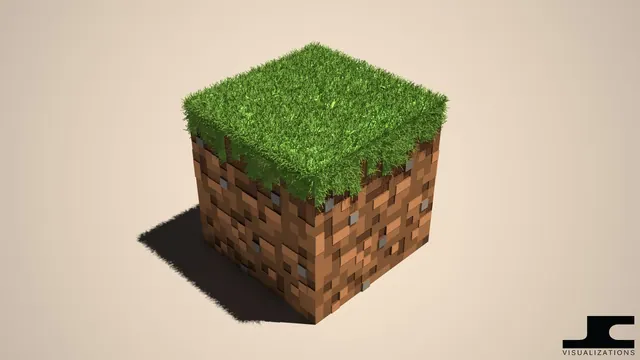
A high-detail 3D render of a Minecraft grass block with glowing vibrant grass against a cloudy sky.
This image isolates the most recognisable element in Minecraft: a single grass block from a plains biome, built as a realistic 3D render in Blender rather than captured in-game. Instead of flat pixel textures, individual blades of vibrant grass catch the light against a cloudy sky, giving a grounded survival-style subject a high-detail finish. Because the source file tops out at a native 1920x1080 resolution, it is built strictly for standard 1080p monitors rather than 1440p or 4K displays, where the fine grass textures would noticeably soften when stretched. You can also download 1280x720 and 854x480 versions for older laptops or lightweight secondary displays, alongside a 480x854 vertical crop meant only for very small or legacy mobile screens.
When setting up your desktop, the composition leaves a calm area along the left and bottom edges. This means default Windows or Linux icon grids docked to the left side of the screen, as well as your bottom taskbar, will sit over darker, less busy textures without obscuring the brightly lit grass tips. If you use the 480x854 mobile crop, the top where a phone clock normally sits is busy with the block's upper edge, so bottom-aligned lock screen widgets work best.
Despite the vibrant mood of the illuminated grass, the measured palette is anchored by deep, earthy greens (#2f3925, #162219), olive (#4b4f2c), and a warm ochre accent (#8d7636). Enabling your operating system's dark mode and setting the system accent colour to a muted gold or olive will tie your window borders directly into the soil and sunlit blades. While this is an external render, you can recreate this look in Java Edition (1.20+) by placing a single grass block high in the air to clear the horizon, installing a 3D grass resource pack with physics-based rendering (PBR), and running a shader with volumetric clouds and subsurface scattering turned on.
Best used as: Use the 1920x1080 file on a standard Full HD desktop monitor with your desktop icons aligned to the left and a dark system theme.
Wallpapers that share the most with this one




More block & item wallpapers

More plains wallpapers


Wallpapers in the same colour family




More desktop wallpapers









