
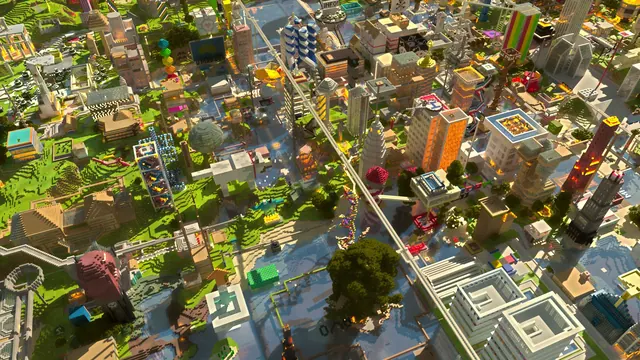
An aerial 3D render showcasing a massive, bustling Minecraft server city filled with skyscrapers, railways, and diverse community builds.
This desktop wallpaper presents an aerial 3D render of a sprawling Minecraft city, captured in the Java Edition on a Plains biome during a bright summer day. The vanilla build features a dense arrangement of skyscrapers, intricate overhead railways, and varied community architecture rendered through Chunky. The overall atmosphere is notably vibrant, with crisp shadows and clear daylight accentuating the sheer scale of the urban layout.
Sourced from a 2048x1152 pixel original, this image provides exact download options of 1920x1080 and 1280x720 for standard desktop monitors, alongside 854x480 and vertical 480x854 options for mobile screens. Because the composition is packed edge-to-edge with detailed structures and transport networks, there are no quiet zones or calm areas; desktop shortcut icons and phone clocks will inevitably overlap with rooftops or railway lines.
The dominant colour palette is grounded in earthy tones, specifically registering dark grey-browns (#373922 and #645338) alongside muted olive and yellowish highlights (#7d7755 and #999563). These natural, weathered hues pair well with a dark olive or charcoal system theme and neutral grey window accents. Note plainly that the source file sits below 4K resolution, making it best suited for 1080p displays rather than ultra-high-definition setups.
Recreating a scene like this in-game requires flattening a large Plains biome and establishing a strict grid system for zoning. Builders should mix smooth stone, concrete, and glass panes for the skyscrapers, and utilise powered rails with minecarts for the transit network. Finally, installing a vibrant vanilla-compatible shader pack and using an external program like Chunky will help achieve this high-angle, orthographic-style render.
Best used as: Choose the 1920x1080 download for standard widescreen monitors, accepting that desktop icons will sit over the detailed city blocks.








