
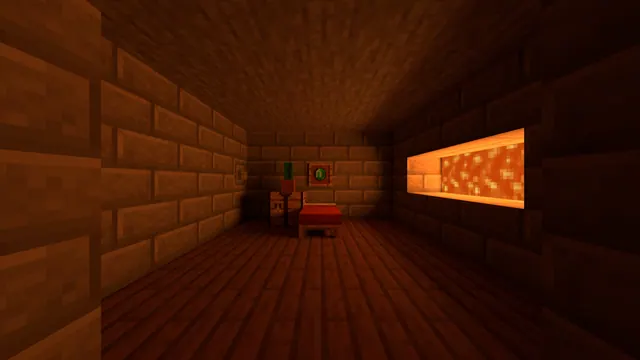
A minimalist Minecraft bedroom with stone brick walls, wooden flooring, a red bed, and a glowing lava wall feature illuminated by warm shaders.
This wallpaper captures a minimalist underground survival base built in Minecraft Java Edition using vanilla blocks. The room relies on stone brick walls and wooden plank flooring, anchored by a classic red bed. Instead of torches or lanterns, the build uses a recessed lava wall feature as the sole light source. A warm shader pack transforms the harsh orange of the lava into a soft, ambient glow that casts deep shadows across the stonework, making it an ideal reference for players who want a functional underground bedroom without visual clutter.
Captured at a native 3840 x 2160 pixels, this 16:9 image fits 4K monitors cleanly, with direct downscales available at 2560x1440, 1920x1080, 1280x720, and 854x480 for standard widescreen displays. If you want to use it on a mobile device, pre-cropped vertical versions at 1080x1920, 720x1280, and 480x854 are also provided. The composition leaves medium copy space with calm areas on the right, top, and bottom, meaning desktop users who align their folders to the right or use a bottom dock will not cover the bed or the lava feature. On a phone, the top calm zone gives the lock-screen clock plenty of breathing room.
The overall mood is decidedly dark, making this a practical choice for late-night gaming setups. The palette is dominated by deep, roasted browns and near-blacks—specifically #190501, #330d01, #451a03, and #532205. To keep your desktop cohesive, pair this wallpaper with a dark system theme and set your OS accent colour to a muted amber or warm terracotta.
To recreate this scene in your own world, hollow out a subterranean room, line the walls with stone bricks, and lay down oak or spruce planks. Carve a channel behind the focal wall for flowing lava, framing it carefully to prevent fire spread to the wooden floor, then enable a shader with volumetric block-light and hide your HUD with F1 before taking the screenshot.
Best used as: Download the 3840x2160 or 2560x1440 file for a widescreen desktop with icons aligned to the right, or pick the 1080x1920 vertical crop for a clean smartphone lock screen.








