
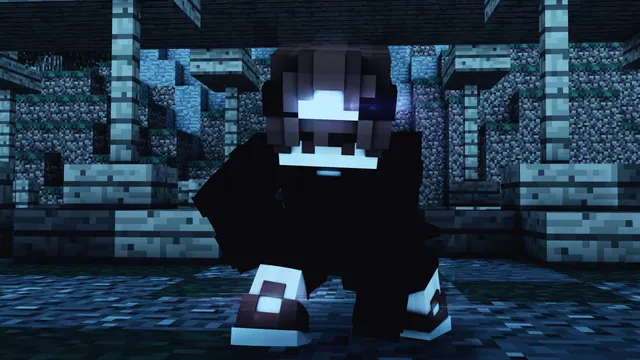
A stylized 3D render of a dark-clothed Minecraft player crouching amidst moody, blue-toned stone ruins.
This Blender 3D render captures a hooded player skin crouching in stone ruins, grounded firmly in Vanilla Java Edition aesthetics. The build style relies on weathered stonework, evoking overgrown dungeon remnants or ancient surface structures lit by a cold, nocturnal glow. To recreate a scene like this in-game, assemble a decaying courtyard using cracked stone bricks, cobblestone walls, and stairs to simulate missing chunks of masonry. Set the time to midnight and export the area into external rendering software, or use a Java shader pack with heavy directional shadows and a blue-tinted night sky to mimic the dramatic lighting.
The native 3840x2160 resolution fits 4K monitors without any upscaling, while 2560x1440, 1920x1080, 1280x720, and 854x480 files cover standard 16:9 desktops and laptops. For mobile devices, the pre-cut 1080x1920, 720x1280, and 480x854 vertical sizes keep the character centred without awkward stretching. Because the crumbling stone textures and lighting shifts fill the entire frame, there are no calm areas for desktop icons or phone lock-screen clocks to sit cleanly. This makes the image best suited for a clutter-free desktop setup where shortcuts are hidden, or a secondary display dedicated purely to background art.
A dark overall mood defines the colour story, which is anchored by a near-black #090b12 and a deep midnight #0b1722 in the heaviest shadows. Mid-tones of #1d344b blend the stone ruins into the background, while #47718c provides a muted slate-blue highlight along the edges of the blocks and the character's hood. Pairing this wallpaper with an operating system's dark mode and setting #47718c as your custom window accent colour creates a unified, low-glare workspace for late-night gaming sessions.
Best used as: Use the native 3840x2160 file on a 4K desktop monitor with desktop icons hidden, or pick the 1080x1920 crop for a phone screen with a minimal clock widget.








