
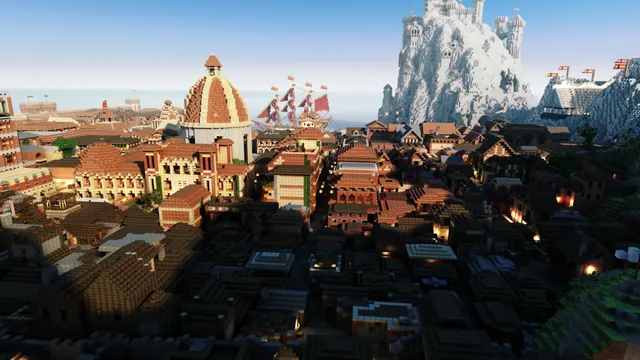
A sprawling medieval Minecraft port city with a grand dome, sailing ship, and a white castle perched high on a snowy mountain peak.
This moody scene shows a sprawling medieval port city anchored by a grand dome and a rigged sailing ship, while a white castle sits high on a snowy mountain peak behind it. Built in vanilla Java Edition from the 1.7 to 1.12 era, the architecture relies on classic stone bricks, dark wood framing, and quartz or snow blocks for the upper fortress, without needing custom texture packs. Rather than using live in-game shaders, the creator exported the world to produce a Chunky render, which calculates realistic ray-traced lighting and deep atmospheric fog across the mountain biome.
The source image is a native 16:10 widescreen at 4000x2500 pixels, giving you plenty of crisp detail for large displays. For standard 16:9 monitors, you can grab the 3840x2160 4K download, alongside 2560x1440, 1920x1080, 1280x720, and 854x480 options. Portrait crops are also prepared at 1080x1920, 720x1280, and 480x854 for mobile screens. Because the sprawling buildings, rigging, and jagged peaks fill the frame from edge to edge, there are no calm areas for desktop icons or phone clock widgets to sit comfortably. It works best if you hide your desktop icons or use a minimalist lock screen.
The palette is anchored by deep shadows in near-black #080b0d and dark slate #101618, contrasted against mid-tone stone grey (#837d78) and a cool, misty sky blue (#bdcddb). Set your operating system to a dark theme and pick a muted slate blue accent colour to match the fog without pulling focus from the render. To recreate a shot like this yourself, export your world region into Chunky, set a low sun angle to cast long shadows across the harbour, and enable volumetric fog to separate the coastal roofs from the high peaks.
Best used as: Download the 3840x2160 crop for a 4K 16:9 desktop monitor with your desktop icons hidden, or use the full 4000x2500 source file if you have a 16:10 display.








