
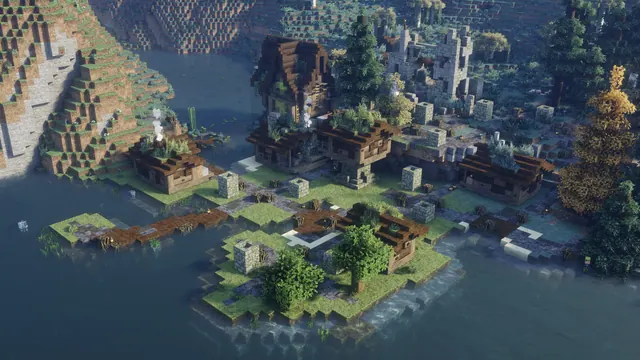
A scenic view of a custom medieval village built along a tranquil river surrounded by hills and forest in Minecraft with shaders.
This screenshot captures a custom medieval settlement built along a river biome in Minecraft Java Edition, drawing heavily on the architectural blocks from the 1.14 Village & Pillage update. Timber-framed houses line the water, backed by hilly terrain and dense forest. An autumn-themed medieval resource pack shifts the foliage away from vanilla greens, while a shader pack introduces volumetric fog and low-angled, diffused lighting. To recreate a scene like this in-game, you will need to combine a medieval texture pack with atmospheric shaders, then lower your field of view (FOV) to around 30 to compress the riverside buildings against the forested hills.
While the original image was captured in a native 21:9 ultrawide aspect ratio at 3440 x 1440 pixels, that raw source file is not among the direct downloads. Instead, the available resolutions are all standard 16:9 widescreen crops: 2560x1440, 1920x1080, 1280x720, and 854x480. Because the largest size is 2K and sits plainly below 4K, this wallpaper is best suited to 1440p and 1080p monitors rather than UHD displays, where upscaling would soften the fine block textures.
Because the village architecture and dense forest fill the entire frame, there are no calm areas for desktop icons or widgets to sit without overlapping the build. If you use this on a PC, you may want to hide your desktop shortcuts or auto-hide the taskbar to keep the river view unobstructed. The moody atmosphere relies on a dark, desaturated palette dominated by deep slate blues (#2f4051, #212e3d) and muted greys (#42515b, #616863). Pairing this background with a dark OS theme and a #42515b slate accent colour will blend your window borders into the misty shadows of the forest.
Best used as: Pick the 2560x1440 or 1920x1080 crop for a standard 16:9 desktop monitor with a clean, icon-free workspace.








