
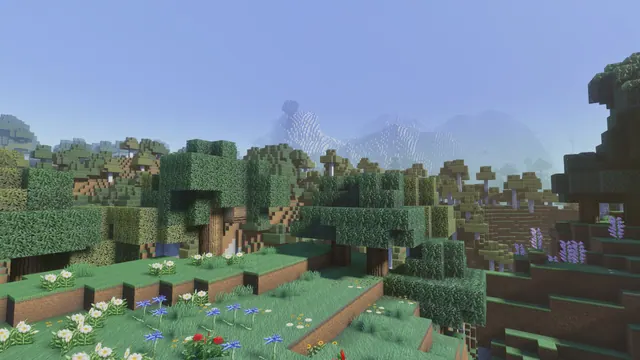
A serene Minecraft forest landscape featuring detailed textures, colorful wildflowers, and distant misty mountains under a clear blue sky.
This moody landscape captures a quiet forest clearing in Java Edition with realistic shaders, trading the game's standard sharp edges for atmospheric depth. Rather than showcasing a complex architectural build, the scene focuses on natural terrain generation enhanced by a high-resolution resource pack. Detailed wildflowers and dense foliage fill the foreground, while shaders introduce a soft mist that obscures the distant mountain peaks. If you want to recreate a shot like this in your own world, seek out a Flower Forest or Meadow biome bordering stony peaks, enable a shader pack with volumetric fog, and lower your field of view to frame the distant ridges against a clear sky.
The image is rendered at a native 3840 x 2160 pixels, making it a true 4K widescreen wallpaper with a 16:9 aspect ratio. For standard desktop monitors and laptops, you can download the exact match for your display, choosing from 3840x2160, 2560x1440, 1920x1080, 1280x720, or 854x480. Mobile users are also catered for with dedicated vertical crops at 1080x1920, 720x1280, and 480x854. Because the composition leaves a medium copy space at the top, the open sky acts as a practical buffer. You can arrange your desktop folders along the upper edge of the screen, or let a mobile lock-screen clock sit in that top zone without obscuring the intricate flower textures below.
The colour story balances earthy woodland greens with cool atmospheric blues, which gives the spring setting its heavier, moody tone. The lower half is anchored by muted sage (#616f58) and deep charcoal-olive (#383c33) in the shadows, while the sky and mountain haze contribute soft periwinkle (#92abdf) and pale slate blue (#9db4dc). To keep your workspace cohesive, pair this with a dark system theme that matches the #383c33 shadow tone, and set your operating system's accent colour to #616f58 or #92abdf so your window borders and taskbar blend naturally into the clearing.
Best used as: Pick the 3840x2160 or 2560x1440 landscape file for a sharp desktop setup with icons aligned along the top edge, or use the 1080x1920 vertical crop on your phone to keep the lock-screen clock legible against the clear blue sky.








