
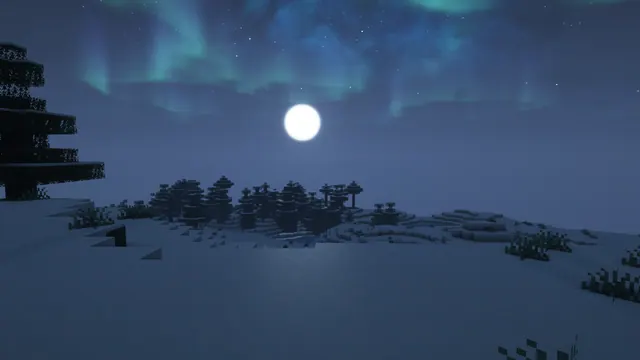
A serene snowy Minecraft taiga landscape at night illuminated by a bright full moon and glowing green aurora borealis in the starry sky.
This wallpaper captures a vanilla Snowy Taiga biome in Java Edition, where standard spruce trees and snow-layered grass blocks are transformed by a third-party shader pack. Rather than relying on custom terrain generation or complex architectural builds, the scene uses natural world generation illuminated by a bright full moon and a green aurora borealis across a starry sky. To recreate this in-game, load a standard survival seed, locate a cold taiga, and apply a shader that supports custom skyboxes and northern lights—such as Complementary or BSL—while setting the time to midnight and turning your field of view down to around 60 for a flatter landscape perspective.
Captured at a native 3840x2160 resolution for 4K desktop monitors, the image maintains crisp block edges on large 16:9 displays. We also provide direct scaled downloads for 2560x1440, 1920x1080, 1280x720, and 854x480 screens, alongside pre-cropped vertical versions at 1080x1920, 720x1280, and 480x854 for mobile devices. Because the composition leaves uncluttered copy space along the top, bottom, and right edges, your desktop shortcuts can sit neatly on the right-hand side if you prefer an unconventional layout, while a phone lock-screen clock at the top and dock icons along the bottom remain completely legible.
Despite the vibrant green ribbons in the sky, the image is anchored by a cool slate-blue colour palette across the shadowed snow and dark spruce needles. The dominant hex values—#2c3f58, #2f435e, #3a5072, and #486488—create a cohesive midnight tone that will not glare at you in a dark room. Pair this background with your operating system's dark mode and set your window accent colour to a muted steel blue (#486488) to match the moonlit snow, or pick a pale mint green to echo the aurora without overwhelming your taskbar.
Best used as: Download the 3840x2160 or 2560x1440 file for a widescreen PC monitor with icons aligned to the right, or pick the 1080x1920 crop for a sharp smartphone lock screen.








