
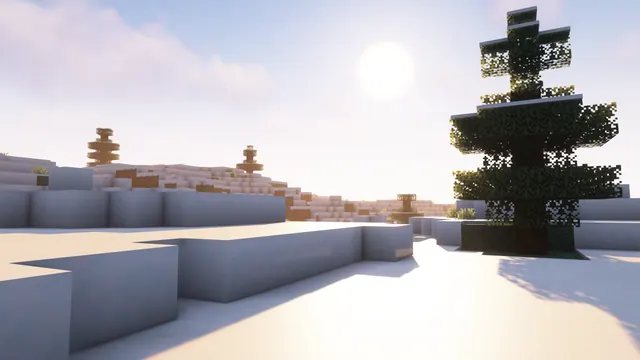
A bright sunny day in a snowy Minecraft tundra biome featuring spruce trees and warm shader lighting.
This shot captures a vanilla Snowy Tundra biome in Java Edition, relying on terrain generation and lighting rather than custom builds. Standard spruce trees — composed of spruce logs and dark needles — break up the flat expanse of snow blocks and snow layers. A shader pack introduces warm, directional sunlight that casts long shadows across the ground, shifting the default cold blue tones of winter into something much softer. If you want to recreate this in your own world, locate a flat tundra bordering a taiga, install a shader with customisable sun angles, set the time to early morning, and lower your field of view to 30 for a compressed landscape perspective.
The source image is a native 3840 x 2160 pixels, making it a true 4K file for large 16:9 desktop monitors. You can also download stepped-down horizontal cuts at 2560x1440, 1920x1080, 1280x720, and 854x480 for laptops or older displays. For mobile devices, vertical crops are provided at 1080x1920, 720x1280, and 480x854. Because the composition features medium copy space along the top edge, the upper sky is the calmest area of the frame. This makes the vertical versions particularly practical for phones, as the lock-screen clock sits clearly in the open sky, while desktop users should align their icons along the top row to keep the trees unobstructed.
Despite the bright snow, the palette is controlled enough to use as a daily background. The dominant colours are warm off-whites (#f7f3f3 and #e7e1e6) balanced by a muted lavender-grey (#9f9eac) in the shadows and a deep slate grey (#44464d) in the shaded spruce trunks. Because the overall mood is light, this image pairs naturally with a light OS theme. For your system accent colour, pick a charcoal or slate grey that matches the #44464d timber; this keeps taskbars and window borders legible against the bright snow without introducing clashing colours.
Best used as: Pick the 3840x2160 file for a 4K desktop with icons arranged along the top edge, or the 1080x1920 vertical crop to give your phone's lock-screen clock a clean background.








