
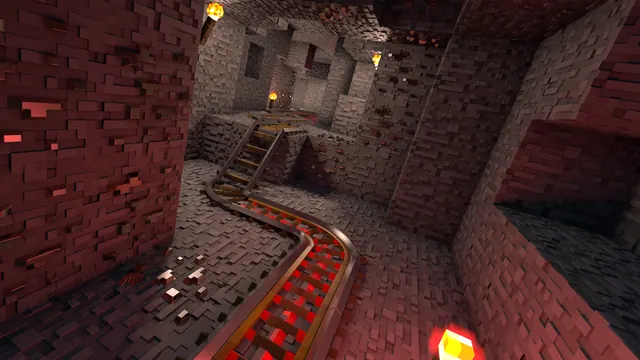
A winding minecart track with glowing redstone rails runs through a detailed underground brick tunnel lit by warm torches.
Captured in Java Edition using a realistic shader pack, this underground build features a winding minecart track set into a medieval brick tunnel. Glowing powered rails and warm wall torches provide the only illumination, casting heavy shadows across the brickwork. Because it is a subterranean interior, biome grass colours do not affect the palette, leaving the shader's point-lighting to define the geometry.
The source image measures 2560 x 1080 pixels, meaning this wallpaper is native to 21:9 ultrawide monitors and caps out below 4K resolution. If you use a standard 16:9 display, pre-cropped downloads are available at 1920x1080, 1280x720, and 854x480. Because the brick detailing and torchlight fill the entire frame, there are no calm areas where desktop icons or a lock-screen clock can sit without clashing with the background. You will want to hide your desktop shortcuts or keep them confined to a secondary monitor.
The colour story is strictly dark and warm, making it easy on the eyes in a dim room. Deep maroon and charcoal-brown tones (#211113 and #3b1617) dominate the shadowy recesses, while the torchlit brickwork lifts into muted rust hues (#3e2121 and #52312e). To make your operating system blend with the tunnel, set your system theme to dark mode and pick a warm terracotta or muted crimson accent colour for your taskbar and window borders.
To recreate this scene in your own world, excavate a curved underground path and line the walls and arched ceiling with stone bricks or deepslate bricks. Alternate standard rails with redstone-powered rails along the floor to get that intermittent red glow, and place torches at irregular intervals to avoid uniform lighting. Finally, turn on a shader that supports emissive redstone textures, drop your field of view to around 60 for a compressed tunnel perspective, and hide your HUD with F1 before taking the screenshot.
Best used as: Use the 2560x1080 source file on a 21:9 ultrawide monitor with desktop icons hidden, or pick the 1920x1080 crop for a standard Full HD screen.








