
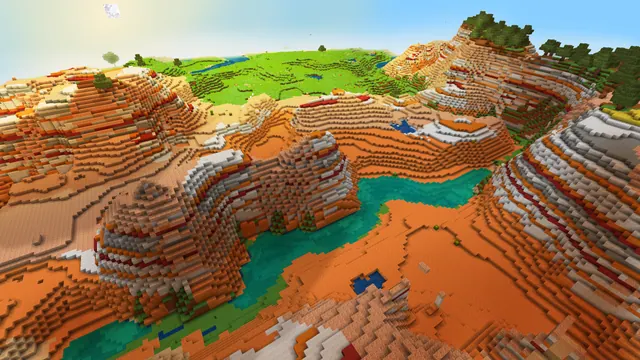
A scenic view of a colorful Minecraft badlands canyon with a winding turquoise river bordering lush green plains under a bright sky.
This shot captures a natural biome border between a Badlands canyon and lush plains in Minecraft Java Edition. Rather than relying on player-built structures or custom textures, the scene showcases pure vanilla terrain generation enhanced by a summer-toned shader. The canyon walls display striated layers of terracotta and red sand, dropping sharply into a winding turquoise river that separates the arid mesa from the green grass blocks on the opposite bank.
The source file is capped at 2K (2560x1440 pixels), meaning it sits below 4K resolution and will need upscaling on ultra-high-definition monitors. It is natively built for 16:9 widescreen displays, with clean downscales available at 1920x1080, 1280x720, and 854x480. There are also two vertical crops at 720x1280 and 480x854 for smaller or older phones. Because the terrain details and shader lighting fill the entire frame, there are no calm areas where icons or text sit well, so this background works best on a clutter-free desktop or with an auto-hiding taskbar.
Despite the vibrant mood and turquoise water, the measured palette is anchored by warm earth tones: muted ochre (#9b7649), deep umber (#553f27), burnt sienna (#9b5024), and pale sand (#dcd4b4). Pairing your operating system with a dark brown taskbar and a burnt orange (#9b5024) accent colour will tie your interface directly into the canyon strata. To capture a similar view in your own world, generate a default Java Edition seed and fly along the edge of a Badlands biome until you find a river cutting between the terracotta and a neighbouring plains biome, then apply a shader that boosts water clarity and midday sun.
Best used as: Use the native 2560x1440 file on a 1440p monitor with desktop icons hidden, or pick the 1920x1080 crop for standard full HD screens.








