
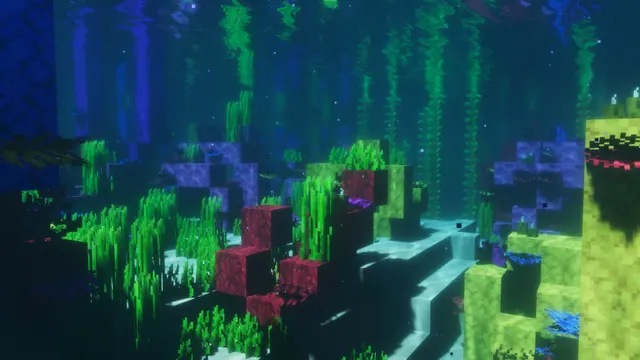
A serene underwater view of a colorful Minecraft coral reef illuminated by soft light with realistic water shaders.
This scene captures a vanilla Warm Ocean biome introduced in the Java Edition 1.13 Update Aquatic. Instead of relying on custom player builds, the composition focuses on natural terrain generation, using coral blocks, fans, and sea pickles to light the ocean floor. A realistic shader pack replaces the standard pixel water with soft volumetric rays, turning a bright reef into a muted underwater landscape. To recreate a shot like this in your own world, locate a natural coral reef, install a shader with underwater fog enabled, and lower your field of view before hiding the interface with F1.
Although the coral itself is colourful, the overall mood of the image is distinctly dark. The palette is anchored by deep marine blues—specifically #134759, #0c2d43, and the near-black #082844—which makes it ideal for OS dark mode themes that avoid harsh screen glare at night. For your system accent colour, pick up the #43955b sea green from the illuminated foliage to give window borders and folder highlights a clean contrast against the dark water.
The native source file is a true 4K 3840x2160 resolution, with 16:9 desktop downscales available at 2560x1440, 1920x1080, 1280x720, and 854x480. Vertical crops for phones are also provided at 1080x1920, 720x1280, and 480x854. Because the reef details fill the entire frame, there are no calm areas for desktop icons or mobile clock widgets to sit cleanly without overlapping the coral textures. This makes the image best suited for a clutter-free secondary monitor, or a desktop setup where you automatically hide your shortcuts.
Best used as: Download the 3840x2160 or 2560x1440 landscape file for a dark-themed desktop monitor where you keep desktop icons hidden.








